Creating Uncommitted Projects via Pylon's API
1. Goals of this guide
When you integrate Pylon with an external system like a CRM or lead provider, you often want to create Projects automatically, but you don’t want to burn credits on addresses you haven’t verified yet.
Uncommitted Projects let you push project data from external systems into Pylon directly.
This guide will walk you through creating and managing Uncommitted Projects via the API. It is intended for a technical audience. You should be comfortable with how to use HTTP APIs and JSON. Examples are given in JavaScript.
If that isn’t you, you may want to send this guide to your IT team or website contractor.
2. What are Uncommitted Projects?
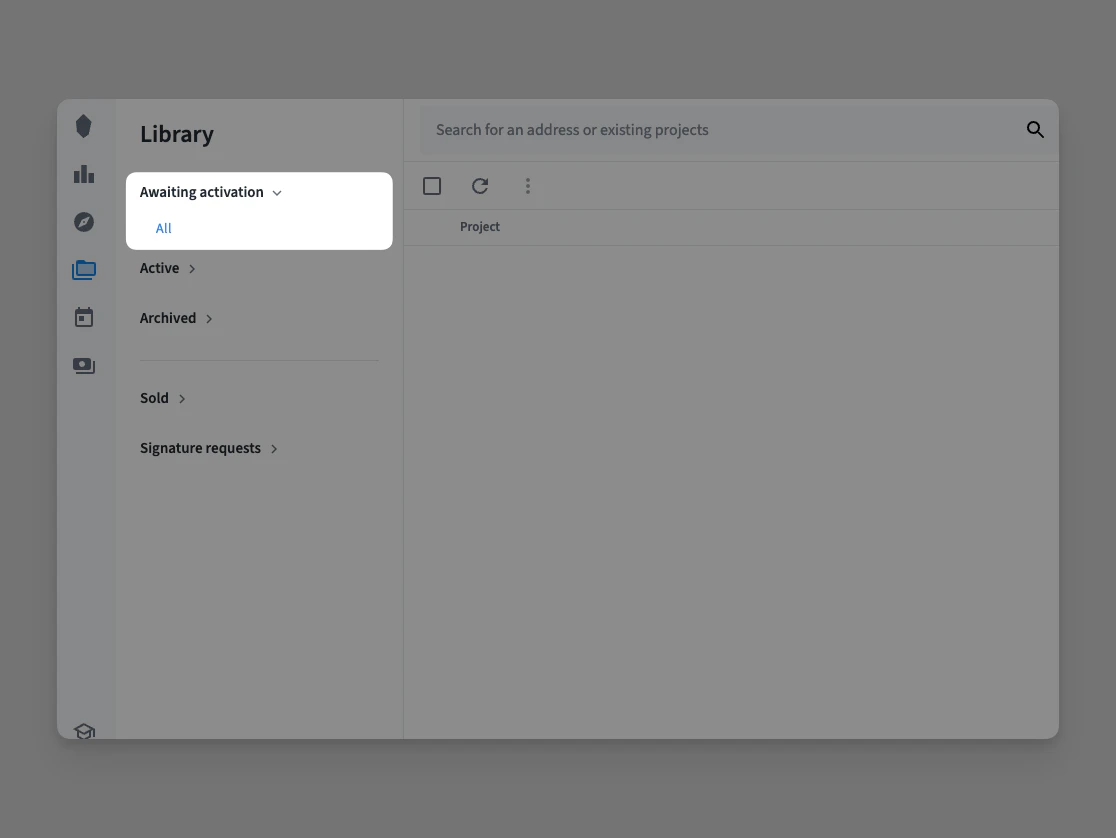
An Uncommitted Project is a solar project that has been created via the API but has not yet been committed. They appear in a dedicated “Awaiting activation” list inside Pylon’s Project Library, where your team can review them before confirming the location.
3. Why use Uncommitted Projects?
Uncommitted Projects let external systems, like your CRM or a lead provider to push project data into Pylon while leaving the location confirmation step to your team.
This is especially valuable when:
- Your CRM creates Projects automatically
- Address quality from third-party lead providers varies and needs review.
- You have high lead volume and only a portion converts to actual designs.
Because credits are only charged at the point of confirmation, this also means credits are never spent on leads that never get verified.
4. Uncommitted Projects vs Deep Links
Pylon offers two ways to create projects from external systems: Uncommitted Projects (this guide) and Deep Links. They solve different problems, so choose the one that fits your workflow.
| Uncommitted Projects | Deep Links | |
|---|---|---|
| How it works | Your server calls the API to create the Project | A user clicks a URL that takes them to Pylon |
| User interaction | None at creation time — a team member reviews later. | Required — someone must click the link and confirm. |
| Best for | Automated integrations (CRM syncs, lead provider webhooks, bulk imports). | CRM interfaces where a user is already looking at a record and wants to open it in Pylon with one click. |
As a rule of thumb: if a machine is creating the project, use Uncommitted Projects. If a person is creating the project, use Deep Links.
5. Creating an Uncommitted Project
Before you begin, make sure you have created an API token in your API settings.
To create an Uncommitted Project, send a POST request to the solar_projects endpoint. Projects default to uncommitted, so you can either omit is_committed or set it to false.
Here is an example request body:
{
  "data": {
    "attributes": {
      "is_committed": false,
      "site_location": [151.2191, -33.8512],
      "reference_number": "CRM-2026-00451",
      "site_address": {
        "line1": "42 Wallaby Way",
        "line2": "",
        "city": "Sydney",
        "state": "New South Wales",
        "zip": "2000",
        "country": "Australia"
      },
      "customer_details": {
        "name": "Jane Smith",
        "phone": "0400 000 111",
        "email": "jane@example.com"
      }
    }
  }
}
And here is the JavaScript to send this request:
let apiToken = "your api token";
let apiBaseUrl = "https://api.getpylon.com/v1";

let requestBody = {
  data: {
    attributes: {
      is_committed: false,
      site_location: [151.2191, -33.8512],
      reference_number: "CRM-2026-00451",
      site_address: {
        line1: "42 Wallaby Way",
        line2: "",
        city: "Sydney",
        state: "New South Wales",
        zip: "2000",
        country: "Australia",
      },
      customer_details: {
        name: "Jane Smith",
        phone: "0400 000 111",
        email: "jane@example.com",
      },
    },
  },
};

let promisedResponse = fetch(apiBaseUrl + "/solar_Projects", {
  method: "POST",
  headers: {
    Authorization: "Bearer " + apiToken,
    "Content-Type": "application/vnd.api+json",
    Accept: "application/vnd.api+json",
  },
  body: JSON.stringify(requestBody),
});

promisedResponse
  .then((response) => response.json())
  .then((json) => console.log(json));
To create a committed project instead, set is_committed to true. Please note that Credits will be consumed for commited projects. Please be sure that the location is correct before creating committed projects.
Your API token does not need the payment permission to create Uncommitted Projects. The payment permission is only required for committed projects.
6. Committing an Uncommitted Project
Uncommitted Projects are committed by your team inside the Pylon UI, there is no API endpoint for this step (yet).
When a user opens an Uncommitted Project from the Project Library, they see the location and customer details provided via the API. They can correct any bad data, then confirm the location. At that point the project becomes a full project and Credits are consumed.
Best practices
Use reference_number to link back to the source system.
Include a reference number derived from the source system’s record ID.
This makes it easy for your team to cross-reference between Pylon and your CRM, and lets you detect duplicates from retries or webhook replays by checking the project list endpoint before creating a new project.
Provide as much customer data as you can. The more data you include, name, email, phone, address, the easier it is for your team to review and commit without digging around in other systems.
Set up webhooks for project lifecycle events. To know when an Uncommitted Project has been committed, configure a webhook destination to listen for project update events. This closes the loop, when your sales team confirms a project in Pylon, your CRM can be updated automatically.
For more detailed information about the Projects API, including all available fields and filtering options, visit our full API documentation.
FAQ
Can Users modify the location of an Uncommitted Project?
Yes. When a user opens an Uncommitted Project, they can adjust the location pin before confirming.
Can I commit to an Uncommitted Project via API?
No, not yet.