Solar Design Feature
Schematic Diagrams
for Solar PV + Battery Systems
Simplify your application process with Design-Driven Schematic Diagrams
Trusted by solar industry leaders

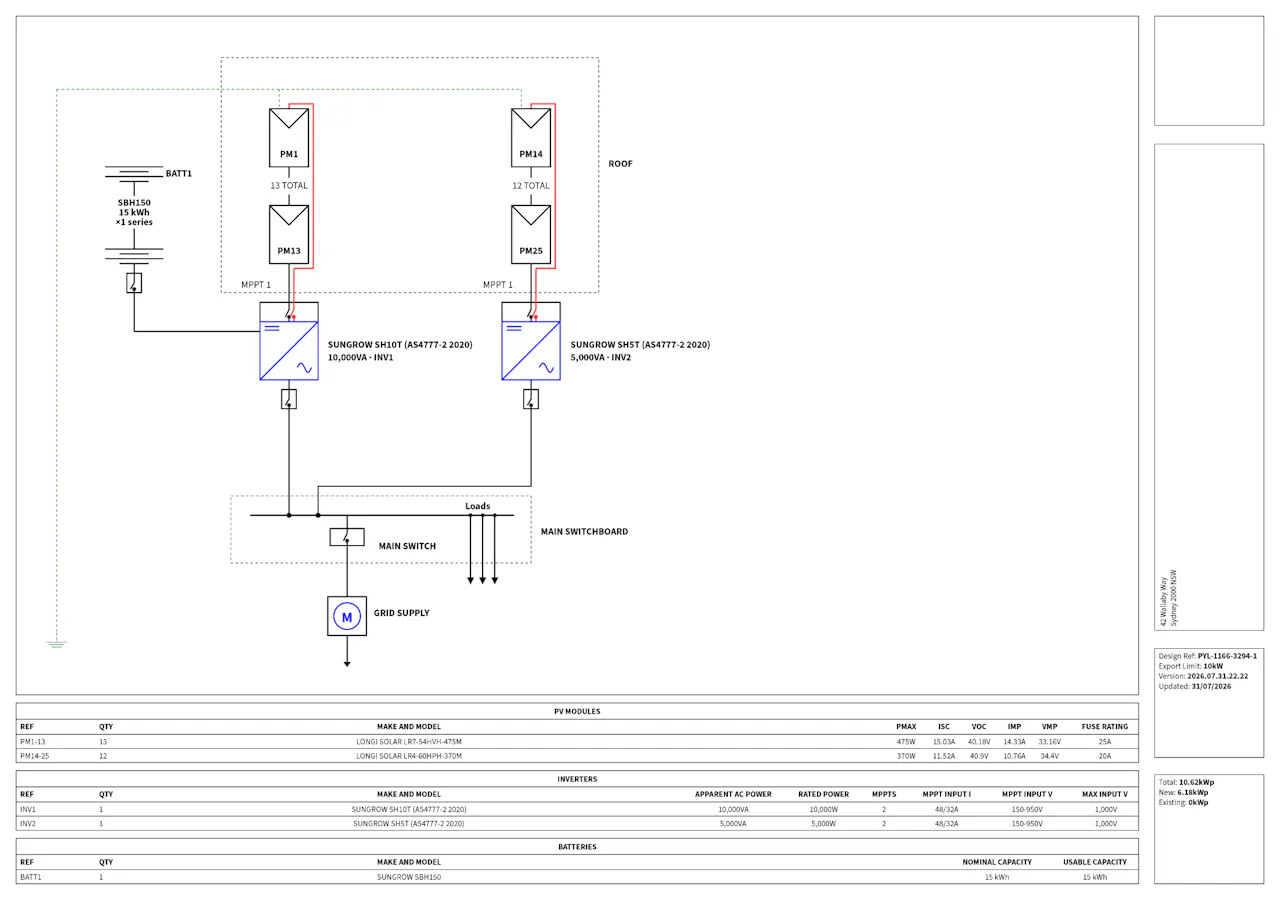
Design-driven Schematic Diagrams
Generate detailed, compliant single line diagrams directly from your solar design.

Smoother Installations
Reduce on-site complications with clear single line diagrams and installer job sheets.

Schematic Diagram FAQ
What is a Schematic Diagram?
A schematic diagram is a simplified drawing that represents a solar and battery system's electrical layout. It is normally required for DNO connection applications and as a guide for installers on site.
Are the Schematic Diagrams generated by Pylon compliant?
Yes. Pylon generates detailed, compliant schematic diagrams that meet the requirements of major Distribution Network Operators (DNOs).
Do you support battery systems in Schematic Diagrams?
Yes. Pylon's schematic diagram generator fully supports Solar PV + Battery storage systems, ensuring all components are correctly represented.
Do you support off-grid systems in Schematic Diagrams?
Yes. Off-grid and hybrid systems are supported, with the diagram reflecting the system's own AC and DC coupling rather than a grid connection point.
Can I customise the Schematic Diagram?
Yes, it is fully customisable. Pylon generates the diagram automatically from your design components (panels, inverters, batteries), and you can then edit every part of it before you export: labels, cable and protection details, and the layout itself.
How much does it cost to generate a Schematic Diagram?
Schematic diagrams are included as part of your project in Pylon. There are no additional fees per diagram generated.
How do I download the Schematic Diagram?
Once your design is complete, you can export the schematic diagram as a high-quality PDF directly from the project dashboard.
Explore more features

3D Shading Simulations
Understand and eliminate potential shading losses from nearby obstructions.
Explore 3D Shading Simulations Thu 14:00 Solar 5.67 kW Battery 0.00 kW Export 4.20 kW Charge 100%
HH Data Analysis
Analyse your customers' historical energy usage to calculate accurate system requirements and savings.
Explore HH Data Analysis
PV System User Manuals
Equip your customers with PV System User Manuals, providing all everything need to understand their solar system.
Explore PV System User Manuals
Richard Christian
Head of Sales UK of Solar Power UK
To be fair it's the best system I've used for generating quotes. They're far more professional looking, adaptable and editing is awesome.